Pages

Showing posts with label tricks. Show all posts

How to Bypass Blocked website to access them

Tuesday, 30 July 2013


At office, school, the library, or anywhere and you try to visit Facebook, Myspace, Youtube or some other site only to find out that the site is blocked, and you can't access it. No one likes to see a page like this:
There are a lot of mrthod to acces the blocked websites and many of them do not work properly. There is a method that amazingly work using proxy.Just follow the given below steps.
Secure the Site:
Facebook ,You tube,Gmail are by default un secured sites.Firstly you have to secured these unsecured sites by following given methods.
1). Use https instead of http
.To secure facebbok you have to add “s” to the End of “http”.The “s” stands for Secure.

http://www.facebook.com ( NOT secure)

https://www.facebook.com (secure)

So to make facebook secured enter the following URL in the address bar. When most firewalls see the "https" they automatically assume the site is secure and let you through. So to access Facebook securely you would just use this instead:

https://www.facebook.com (secure)


2). Access the blocked site through a VPN: VPN stands for “Virtual Private Network”. VPN's are basically a "tunnel" through the internet. These are generally not free, BUT can be very cheap. A good one that I recommend is PUREVPN. You get your own IP address and all traffic is encrypted.
3). Use a Proxy, Anonymizer : it's just kind of finding out one that your school or office doesn't know about and hasn't added to their blocked sites firewall list.You do not require you to download anything; you simply visit their website and find an address bar to type the URL of the blocked site that you want to access as shown below.
Here are just a few free anonymous proxy sites which will help you to access the proxy site.

· HideMyAss.com

· Freezoo.org

· SneakyFilters.info

· Guardster.com - Controls cookies, scripts, ADs, images and referrers.

· ProxyWeb.net - can delete Java, JavaScript, cookies and ActiveX. Uses secure HTTPS connection - so almost nobody can detect what you download from the Internet.
Not all of these will always work, you may need to try a bunch of them - it depends on your school's firewall settings and how good their IT department is.


Full Version
Read more ...

How to Lock your computer by usb flash drive.

Friday, 26 July 2013


There is amazing trick by which you can lock your computer/laptop by usb flash drive using predator.
Predator enables you to lock and unlock computer by removing and inserting usb flash drive.Basic concept behind this trick is that programm produce a security code when you insert a usb.If you enter correct security code the you can acces your computer.But if any one who does not know and try to unlock your computer then he/she wil be asked to enter the code.if he/she enter does not enter correct code in 20 seconds then alarm will sound and he/she will not access your computer.
Intresting fact is that predator change your security code frequently,so if any one copy your usb security code he wil not able to access because security code will continuously change.follow the given below steps to lock your computer.
1).
Download predator.
2).
Predator will automatically open after its installation.
3).
Insert usb flah drive in your computer.
4).
Now you will be asked to enter password.
5).
Click on “ok” and set new password.
6).
Choose correct drive letter”usb key drive”.
7).
Click on “create key”.
8).
Click on “ok”.


Read more ...

How to Permanentaly Delete virus from usb using cmd

Friday, 26 July 2013


When you are using usb to transfer data,then virus will transfer in your flash or system.You format USB to delete all data and virus.But some kind of virus never deletd by formatting.I ma sharing with you a method by which you can permanentally delete virus using command prompt.Now follow given below steps to format pen drive.

1).

Insert usb in your computer.

2).

Find drive letter of usb.

3).

Press (window key +R) simultaneously.Run window will appear.

4)

Type “cmd” without qoutes.Press “ENTER”command prompt window will open.

5).

In command prompt window type (format your pen drive letter:) for example type “format g:” without qoutes.

6).

Hit “ENTER” twice.

7).

Wait few seconds until command prompt verify the file system.

8).

Command prompt will ask you to enter the drive name.

9).

Type drive name and hit enter again.

10).

Now all virus will be deleted from usb.


Read more ...

How to Active Bluetooth software in window xp

Thursday, 25 July 2013


Laptop or notebook computer has by default Bluetooth application to transfer files.Many softwares are also available as a Bluetooth software.But,there is a hidden Bluetooth software in window xp for file transfer and you do not need to any third party software.To use your hidden bluetooth software follow the given below steps.
1).
Go to start>>run or simply press (window key + R).Run window will open.
2)
Type “fsquirt” without commas.
3).
Hit “ok”.
4).
Blutetooth software wizard will open.
5).
Click on “ok”.
6).
A new window will appear with an option “send a file” and “recieve a file”.
7).
Choose particular option to send a file or recieve a file what you want.
Note:This trcik also applicable on window 7.


Read more ...

How to Make 1000 Folders Quickly

Thursday, 25 July 2013


This post show funny trick to make 1000 folders in few seconds by notepad coding.To annoy your friends by making thousands folders you have to follow the given below steps.

1).

Open notepad from start button.

2).

Copy and paste the given below code in notepad.


@echo off

:top

md %random%

3).

Click on "file" on upper left corner.

4).

click on "save as".

5).

Save this file with .bat extension.For example save as "trick.bat" without commas.


Read more ...

How to Find IP of any Website through Command Prompt

Thursday, 25 July 2013


An interesting way to get the IP of a site is to "ping" it. "Pinging" is a command which tells you if the connection between your computer and a particular domain is working correctly and in return it sends you the IP address of particular site.Here are some steps to find IP which are given below.

1).Press “window key + R” to open the “Run” window from Keyboard.

2).Type “cmd” without qoutes in RUN window.

3).Hit “ok”. Command Prompt will open.

4).Once you open the command window, the end of the text will look something like:
c:\Users\[your user name here]>

5). c:\Users\[your user name here]>
Right after the ">" type in ping [the website].com
make sure you put a space between ping and the URL and do not put bracket [ ] around the website name.

6). See an example, pinging myspace: ping myspace.com
7). It will show myspace IP address as: 63.135.80.49
Note: sometimes you will get more than one IP address, that's ok, many sites have multiple IP addresses. Just use any of them. If you get a "Timed Out" then there was an error trying to ping the site
Read more ...

how lock pc in single click???

Monday, 4 March 2013
Mostly you lock your pc by simply clicking on shutdown.IF you are in hurry you also use keyboard shortcut key ctrl+alt+del.Now you can also shut down your pc in one click by creating a shortcut.
In order to shut down your pc in single click just follow the following steps.
Steps
1. Right click on empty slots on desktop go to "new" and then click "shortcut".
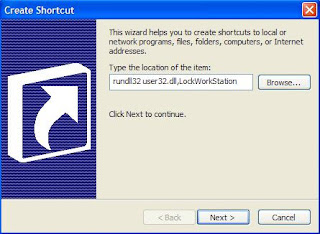
2. A dialog box will appear,in this box paste the following  highlighted code in the type the location of the item.

rundll32 user32.dll,LockWorkStation

Create a Shrtcut to lock your System
3. click on next and type the name for shortcut which you want.
4. click on finish.
Now you will be able to lock your computer by double clicking on shortcut menu and system will locked.


Read more ...

Cool keyboard trick

Monday, 4 March 2013
Keyboards usually have small LEDs which indicate whether different types of locks are activated or not. Here is a trick to use the lights of your keyboard in a more creative manner in Windows.

This trick uses a simple Visual Basic Script (code) which when activated makes your Scroll lock, Caps lock and num lock LEDs flash in a cool rhythmic way and your keyboard caps lock lights will blink.

Keyboard tricks

To make your own live disco, follow the steps given below:-

1. Open Notepad.
2. Copy paste the exact code given below:-

Set wshShell =wscript.CreateObject("WScript.Shell")
do
wscript.sleep 100
wshshell.sendkeys "{CAPSLOCK}"
wshshell.sendkeys "{NUMLOCK}"
wshshell.sendkeys "{SCROLLLOCK}"
loop
3. Save the file as Disco.vbs or anything which you want with vbs extension.


Double click on the Saved file to see the LED lights on your keyboard go crazy and make your own cool disco.


You can disable the keyboard disco by starting Task Manager and ending the wscript.exe process.
Read more ...

Make your Computer Talk....

Thursday, 28 February 2013
Computer has made our life simple and easy.Things which were impossible and difficult now can be done easily by using computer fastest growing technology.we input in computer using keyboard and mouse,computer process input and  convert it into output.At the same time one question arises in our mind ,
what computer can speak which input we have entered????? The answer is yes,it can do it.You can  create
a  script in windows which will make your computer speak whatever you input in it.
To create a one such talk script follow these steps given below.
Steps
Open notepad.Copy and paste exact code given below.

Dim Message, Speak
          Message=InputBox("Enter text","Speak")
          Set Speak=CreateObject("sapi.spvoice")
          Speak.Speak Message

click on file menu>>>save as and save the file speak.vbs .
Double click on the save file named as speak a window will open like the image given below.

Make your Computer Talk

Enter some text in enter text box and click ok.Now your computer will speak what you typed in text box.
           
Read more ...

How to lock a folder???

Thursday, 28 February 2013
In order to restrict access to important files and folders you can lock your folder by setting password.In that way your files and folders become protected and only one can access to the folders and files who knows the password.There are a lot of method of setting password to folder,software are also available but you can also use simple method to lock your folder by using following method.It will keep your important and personal data save and secured.
First of all, create a folder that will house your password protected folder, this is just an ordinary folder and can be located anywhere and named anything.

Navigate into your newly created folder and create a new Text Document. This can easily be done from the context menu.


Open the document, now paste the following code into the text document.


cls 
@ECHO OFF 
title Folder Private 
if EXIST "HTG Locker" goto UNLOCK 
if NOT EXIST Private goto MDLOCKER 
:CONFIRM 
echo Are you sure you want to lock the folder(Y/N) 
set/p "cho=>" 
if %cho%==Y goto LOCK 
if %cho%==y goto LOCK 
if %cho%==n goto END 
if %cho%==N goto END 
echo Invalid choice. 
goto CONFIRM 
:LOCK 
ren Private "HTG Locker" 
attrib +h +s "HTG Locker" 
echo Folder locked 
goto End 
:UNLOCK 
echo Enter password to unlock folder 
set/p "pass=>" 
if NOT %pass%== PASSWORD_GOES_HERE goto FAIL 
attrib -h -s "HTG Locker" 
ren "HTG Locker" Private 
echo Folder Unlocked successfully 
goto End 
:FAIL 
echo Invalid password 
goto end 
:MDLOCKER 
md Private 
echo Private created successfully 
goto End 
:End

Change the highlited statment into password which you want to apply in code.  PASSWORD_GOES_HERE text to the password you want to set. Now go ahead and save the file as locker.bat with bat extension.
Once the code is saved as a batch file in word document you can delete the original text document file.
Now run your batch file (locker.bat) by double clicking on it–the first time you run it, it will create a folder called Private. This is where you can store all your secret things and important data. When you have finished adding all your important data  into the Private folder, run locker.bat again by simply double clicking on it.
Now run your batch file by double clicking on it–the first time you run it, it will create a folder called Private. This is where you can store all your secret things. When you have finished adding all your stuff to the Private folder, run locker.bat again.
This time you will be asked if you sure that you want to lock the folder, press the “Y” key for yes n "N" for no and hit enter to lock your folder.
You will see that your Private folder quickly disappears.
If you run locker file , you will asked to enter password.
If you enter the same password as you set in the code saved in text document, the Private folder will reappear if you enter the incorrect password the script will just Terminate.So,in this way you can set password to lock your folder.
Read more ...